The M4 Max Mac Studio got a hat. It's an OWC StudioStack, a Thunderbolt 5 dock with drive bays that is the same footprint as the Studio. We put one 8 TB NVMe stick in it and left the hard-drive bay empty. Right now its job is to hold the Downloads folder, so the 2 TB internal SSD stops filling up. The bigger reason is model files: Milo kept running into trouble pulling down huge model checkpoints onto a 2 TB drive that was already more than half full. With 7.3 TiB free behind an 80 Gb/s link, that stops being a problem.

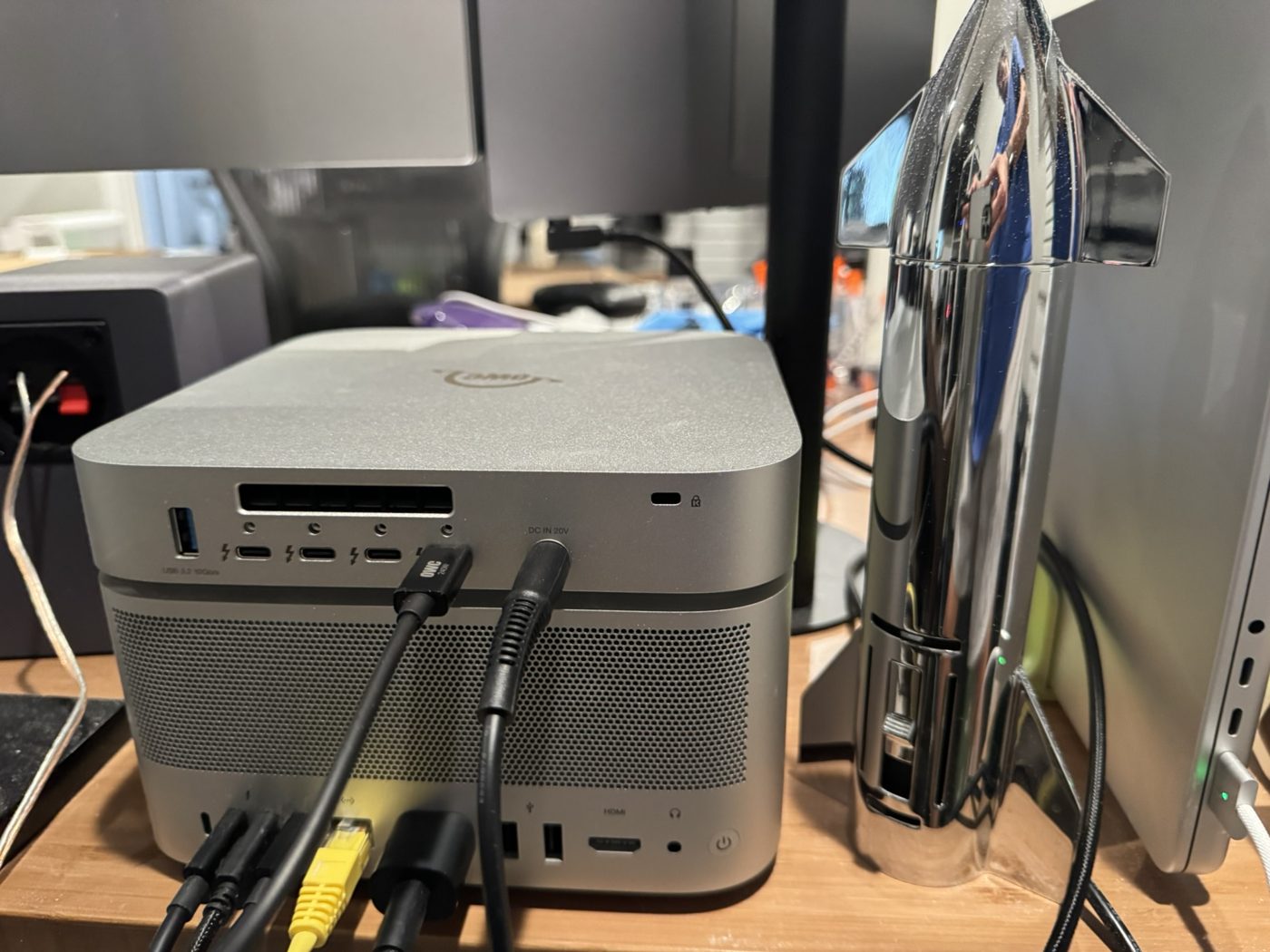
What's in it
| Part | What's there | How we know |
|---|---|---|
| Host | Mac Studio M4 Max (Mac16,9), 64 GB unified memory, 2 TB internal Apple SSD (AP2048Z) | sysctl hw.model, hw.memsize, system_profiler |
| Dock | OWC StudioStack, firmware 64.1, running in USB4 v2 mode | system_profiler SPThunderboltDataType |
| Link to the Mac | 80 Gb/s (Thunderbolt 5) on one Studio port. A CalDigit Element 5 hub and the LG 32U990A display are on a different port. | Thunderbolt tree |
| M.2 slot | WD_BLACK SN850X 8000 GB, PCIe 4.0 x4 (16 GT/s), SMART Verified | diskutil info, NVMe link report |
| 3.5-inch SATA bay | Empty. Only one disk shows up behind the dock. | diskutil list external |
| Downstream ports | 3× Thunderbolt 5 all show "No device connected." There are also 3× USB-A at 10 Gb/s. | Thunderbolt tree; OWC spec sheet |
| Format | One APFS volume called 8TB, case-insensitive, created October 7, 2026 | diskutil apfs list, volume birth time |
| Job | ~/Downloads is a symlink to /Volumes/8TB/Downloads (set up October 7). The Hugging Face cache, ~/.cache/huggingface, now points to /Volumes/8TB/huggingface (moved October 16). 639 GiB is used of 7.3 TiB. | ls -la, df -h, hf cache ls |
The reason is simple. The internal 2 TB drive had 1.1 TiB used and 746 GiB free when we measured it. Downloads is the folder that grows on its own, and it is the safest one to move: if the dock is unplugged, the symlink just points at nothing. Nothing in the agent stack or the model servers depends on it.
How fast it is
This is one quick dd pass with 16 MiB blocks, not a full fio sweep. The Mac was doing normal work in the background while we ran it.
| Test | StudioStack SN850X | Internal 2 TB |
|---|---|---|
Sequential read, large existing file → /dev/null | 6.29 GB/s (44.1 GB file) 6.20 GB/s (39.3 GB file) | 6.72 GB/s (80.0 GB file) |
Sequential write, 20 GiB of zeros, timed through sync | 3.59 GB/s | 4.56 GB/s |
Same write, without waiting for sync (page cache helps) | 5.51 GB/s | not run |
Reads hit the limit of the link. OWC says the StudioStack tops out at 6,302 MB/s on Thunderbolt 5 hosts, and we measured 6,200–6,290 MB/s. The SN850X can read faster than that on its own, but the Thunderbolt connection is the cap. The internal Apple SSD read about 7% faster and wrote about 27% faster (or put the other way, the StudioStack wrote about 21% slower). For downloads and loading model files, that gap doesn't matter much.
What it costs
The other way to get more storage is to pay Apple for a bigger internal SSD when you order the Mac. Here is how the two compare, using public prices checked on October 16, 2026. These are not the prices we paid.
| Apple internal SSD upgrade | StudioStack + 8 TB SN850X | |
|---|---|---|
| Price | $3,000 to go from 2 TB to 8 TB on the M4 Max 64 GB Mac Studio ($4,299 → $7,299, Apple prices after the June 2026 increase). It was $1,800 at the 2025 launch. | about $1,910–$2,010: $379.99 for the empty enclosure (OWC) plus $1,529.99–$1,629.99 for the drive (Best Buy) |
| Space you end up with | 8 TB total, because it replaces the 2 TB | 10 TB total: the 2 TB internal plus 8 TB external |
| Cost per added TB | about $500/TB ($3,000 for 6 TB more) | about $240–250/TB |
| Sequential read (our test) | 6.72 GB/s | 6.20–6.29 GB/s |
| When you decide | Only when you order the Mac | Anytime, and you can swap in a bigger drive later |
| Extras | None | 3× Thunderbolt 5, 3× USB-A, and an empty 3.5-inch bay for up to 24 TB |
| Downsides | It costs about twice as much per TB, and the size is locked in when you buy | It can be unplugged, it needs its own power brick, and it uses one of the Mac's Thunderbolt ports |
Apple now sells the M5 Max Mac Studio, so the M4 Max prices above come from Basic Apple Guy's price tracking (June 27, 2026). The 2025 launch prices come from AppleInsider and Digital Trends. Prices for 8 TB SSDs move around a lot, so check them yourself before buying.
What's still open
- The 3.5-inch bay is empty. OWC supports drives up to 24 TB there.
- None of the three downstream Thunderbolt 5 ports are in use yet.
- Done on October 16: the Hugging Face cache moved to this drive. That was 822 files and 33.5 GB, checked by file count and size before the switch.
~/.cache/huggingfaceis now a symlink, so every tool that uses the default path writes here without any config change. If the drive is not mounted, downloads fail instead of quietly filling the internal SSD. The long-term model archive stays on the NAS.