Last night I built a personal health data platform from scratch. Not a startup. Not a SaaS product. Just a single SQLite database on a Mac Studio, aggregating every health data point from every wearable and app into one queryable place.
By the end of the session: 12.97 million data points spanning nearly a decade of continuous health monitoring, all accessible via SQL.
It started with a Numbers spreadsheet for tracking injections — which site, which compound, which day. It worked until it didn't. Extracting anything useful from it meant manual queries and a lot of scrolling. I wanted something I could actually ask questions of.
I also have an APOE 4/4 genotype and some labs that need attention. I had Whoop data, Withings scale and blood pressure readings, and several years of Marek Health bloodwork — none of it connected. The hope is that with everything in one place, an AI can do something useful with it: surface patterns, flag trends, maybe eventually connect compliance data to biomarker changes between draws.
One thing worth noting: OpenClaw — the AI gateway running all of this — turned out to be particularly good at this kind of integration work. Connecting a new data source, wiring up a cron, adding a tool — things that would normally take days got done in hours. The whole system in this post was built in a single session.
Health data is balkanized by design. Apple Health has steps and heart rate. Whoop has recovery scores and strain. Your doctor has lab results in a PDF. Your medication protocol lives in a spreadsheet (or your head). No single system connects "I skipped my meds for a week" to "my LDL went up 30 points."
I wanted everything in one place. Not to build a product — just to answer questions like:
The whole system is four components:
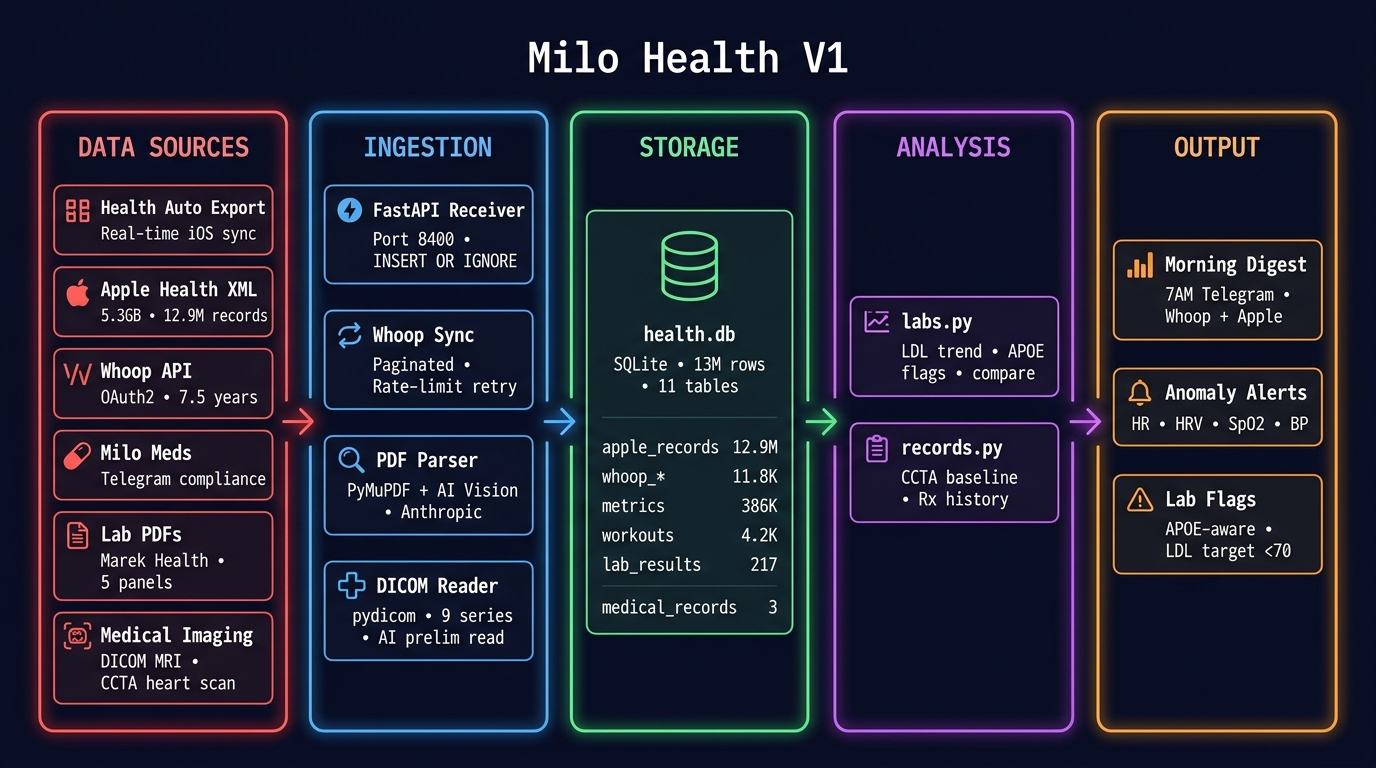
One SQLite file. No Postgres. No Docker. No Kubernetes. Just sqlite3 health.db and you're querying a decade of health data.
Apple Health stores everything your iPhone and Apple Watch have ever measured. The trick is getting it out. Apple provides an "Export All Health Data" feature that produces an XML file — mine was 5.3 GB.
I wrote a streaming SAX parser (parse_export.py) that processes the XML in a single pass without loading it into memory. It ran in 135 seconds and produced:
| Table | Records | Date Range |
|---|---|---|
| apple_records | 12,921,642 | Jun 2016 – Apr 2026 |
| apple_workouts | 5,718 | Nov 2016 – Apr 2026 |
| apple_activity_summaries | 3,418 | 2017 – 2026 |
98 distinct metric types: heart rate, blood pressure, HRV, respiratory rate, blood oxygen, walking asymmetry, six-minute walk distance, stair speed, and dozens more.
Two hardware devices feed Apple Health automatically and flow into Milo Health as a result:
The integration is passive — both devices sync to Apple Health natively, and Health Auto Export picks them up on the next scheduled push. Withings becomes part of the pipeline without any custom API work.
Health Auto Export is an iOS app that periodically POSTs new Apple Health data to a REST endpoint. I pointed it at a FastAPI server running on the Mac Studio (via Tailscale), and now new health data flows in automatically whenever my phone is unlocked.
This gave us the real-time pipeline — but it also taught us a lesson about data at scale (more on that below).
Whoop is the most valuable data source in the system. Unlike Apple Health's intermittent sampling, Whoop provides continuous 24/7 heart rate monitoring. The difference matters:
I wrote whoop_sync.py — a direct Whoop API client with OAuth2 auto-refresh, paginated fetching, and 429 retry with exponential backoff. The full historical backfill pulled 7.5 years of data:
| Table | Records | Since |
|---|---|---|
| whoop_cycles | 2,542 | Nov 2018 |
| whoop_recovery | 2,494 | Nov 2018 |
| whoop_sleep | 4,017 | Nov 2018 |
| whoop_workouts | 2,777 | Nov 2018 |
A daily sync cron runs at 6:30 AM pulling the last 3 days, keeping the data fresh before the morning digest.
This is the part that makes the system clinically useful. I'm on a complex protocol — 12 compounds across three daily stacks. With an APOE 4/4 genotype and LDL at 209, skipping NEXLETOL isn't a minor inconvenience. Missing doses has measurable consequences at the next lab draw.
Three silent crons create native Apple Reminders throughout the day — no notification spam, just a standard iPhone reminder at the right time. A poller cron runs every 15 minutes checking for completions and logging them to compliance-log.jsonl. Stale uncompleted reminders get swept at 11 PM and marked missed.
The reminders are dynamically generated each day. Injection site is calculated from the date — even/odd for BPC knee alternation, day-of-month mod 6 for abdomen rotation. The compound list changes by day of week. Sunday's morning stack looks nothing like Wednesday's.
Injection site is embedded in the reminder title itself — [INJ] BPC-157 300mcg SubQ — R knee medial — so the compliance log captures where each injection went, not just that it happened. The end-of-month report audits rotation adherence alongside dose compliance.
The JSONL log captures timestamp, stack, compound, dose, status (taken/missed), source (Apple Reminders vs manual Telegram reply), and injection site. A weekly report lands every Sunday. The end-of-month report ranks all 12 medications by compliance percentage, worst to best, with a spotlight on the bottom performer.
The long game: Phase 3 correlates 8-week compliance windows against biomarker changes at the next lab draw. If L-Carnitine is driving my TMAO spike — it went from <3.3 to 16.5 between panels — the data will show it.
Every morning at 7 AM, a cron job queries the database and sends a Telegram message with:
No app to open. No dashboard to check. Just a Telegram message with the numbers that matter.
Step count alone: 1.45 million rows. Active energy: 1.3 million. Those two metrics were 99.1% of the entire table. The database hit 7 GB.
The fix was three-fold:
(metric_name, date, source) — INSERT OR IGNORE drops duplicates at write timeApple Health's export format is a single XML file. Mine was 5.3 GB. A DOM parser would need 20+ GB of RAM. The streaming SAX parser processes it in a single pass — peak memory under 100 MB, finished in 135 seconds. Worth the extra code.
An Opus-powered code review (Claude Opus 4.6, reviewing the entire system) caught a latent bug: an undefined variable ae in the workout processing path. It would only fire on workout payloads missing start/end fields — rare but guaranteed to eventually crash the server in production. Fixed before it ever hit.
The ~/Documents/Marek/ folder had six lab result PDFs spanning June 2023 to February 2026. Some were text-extractable LabCorp reports. The February 2026 panel was image-based and password-protected. Different formats, different labs, same patient.
The pipeline:
Result: 5 panels, 217 marker results, all queryable:
sqlite> SELECT marker, value, draw_date FROM lab_results
        JOIN lab_panels ON panel_id = lab_panels.id
        WHERE marker = 'LDL' ORDER BY draw_date;

LDL | 180 | 2023-06-09
LDL | 141 | 2023-10-18
LDL | 167 | 2025-06-16
LDL | 209 | 2026-02-06   ← target: <70
A Cleerly CCTA (Coronary CT Angiography with AI analysis) from July 2025 was also ingested. This isn't just a calcium score — it's actual volumetric measurement of every type of plaque in every coronary artery, analyzed by Cleerly's AI.
Key findings:
This scan becomes the regression baseline. If lipid management gets optimized (currently LDL 209, target <70), a repeat CCTA in 1-2 years should show measurable plaque reduction. That's the whole point of having the data.
Final schema: 9 tables in a single SQLite file.
| Table | Rows | Source | Purpose |
|---|---|---|---|
| apple_records | 12,921,642 | XML export | Full Apple Health history |
| apple_workouts | 5,718 | XML export | Workout details |
| apple_activity_summaries | 3,418 | XML export | Daily activity rings |
| metrics | ~386K | Health Auto Export | Real-time health metrics |
| workouts | ~4,177 | Health Auto Export | Real-time workouts |
| whoop_cycles | 2,542 | Whoop API | Daily strain/recovery cycles |
| whoop_recovery | 2,494 | Whoop API | HRV, RHR, SpO2, skin temp |
| whoop_sleep | 4,017 | Whoop API | Sleep staging, respiratory rate |
| whoop_workouts | 2,777 | Whoop API | HR zones, strain, sport type |
| lab_panels + lab_results | 5 + 217 | Marek Health PDFs | Blood work: LDL, ApoB, hormones, CBC, etc. |
| medical_records | 3 | Manual + PDF | CCTA, genetic tests, imaging |
| rx_history | 12 | Manual | Medication start/stop/adjust history |
Total: ~12.97 million rows plus 217 lab results and medical records. File size: ~7.4 GB. SQLite handles this without breaking a sweat — WAL mode for concurrent reads, indexed on the access patterns the digest cron actually uses.
This is a single-user health system running on one machine. There is no concurrent write contention. There is no horizontal scaling requirement. Postgres would add operational overhead (backups, upgrades, WAL archival, connection pooling) for zero benefit.
SQLite at 13 million rows is well within its tested range. The only scaling concern was the metrics table bloat — which was a dedup problem, not a SQLite problem. With proper constraints, the database will grow at ~100 rows/day indefinitely.
Your health data already exists — scattered across apps, wearables, and PDFs. The infrastructure to unify it is surprisingly simple: a FastAPI server, a Whoop API client, an XML parser, and SQLite. No cloud. No subscription. Just your data, queryable, on your machine.
The entire system was built in one session. The code is straightforward Python. The hard part isn't the engineering — it's deciding to own your data instead of renting access to it through someone else's dashboard.