Adding an RTX PRO 6000 Blackwell Max-Q to the DGX Station GB300
Where the model lives
The card's job here is memory placement, not spare FLOPS. DeepSeek-V4.1-Flash-1017 is 40 MoE layers of 384 experts with 6 active per token: 268.9 GiB of routed experts and 189.2 GiB of Engram in a 475 GiB checkpoint, against 250.7 GiB of HBM and 494.5 GiB of Grace in this Station. The experts cannot all sit in HBM beside a 1M-token KV cache, so roughly 62 GiB of them have to live somewhere else — and every decode step that routes a token to one of those pays for wherever "somewhere else" is.
Figure 1. Where the model's bytes sit, before and after the card, and the bandwidth of each tier. Bar length is proportional to capacity. Sizes read on 2026-10-22: 250.7 GiB HBM, 494.5 GiB Grace, 95.6 GiB of the card's 96 GB (66,213 MiB in use). The 295/89 expert split is the served map; bandwidths are NVIDIA datasheets except the measured C2C row, which is our own 256-byte gather microbenchmark.
Before the card that tier was Grace: 60 GiB of experts read over NVLink-C2C one gather at a time, on the critical path. With the card it is 62.3 GiB of ranked cold experts resident on the 6000 and computed there. Weights stop moving; only activations cross the PCIe slot — a few KB per token row, 0.015 ms per layer, measured over 5.7M handoffs.
What went in
Read from the box, not from the invoice: nvidia-smi, lspci and uname on 2026-10-22.
| Before (2026-09-01 → 2026-10-21) | After (2026-10-21 →) | |
|---|---|---|
| Card | NVIDIA RTX PRO 4000 Blackwell SFF | NVIDIA RTX PRO 6000 Blackwell Max-Q Workstation Edition, PN 900-5G153-2200-000 |
| Memory | 24 GB | 96 GB GDDR7 ECC — 97,887 MiB reported, 1,792 GB/s |
| Power | 70 W, no auxiliary plug | 300 W default, range 250–325 W, 1× 16-pin (12V-2x6) |
| Displays | 4× Mini DisplayPort | 4× full-size DisplayPort 2.1b |
| PCI address | 0004:01:00.0 | 0004:01:00.0 — same slot, same address |
| PCI ID | RTX PRO 4000 | 10de:2bb4, arch 12.0 (SM120) |
| Role | Display + JetKVM | Display + MoE expert sidecar |
The host side is unchanged, and every number below is scoped to it: GB300 at 0009:06:00.0 (10de:31c3, SM103), 256,703 MiB HBM, GPU limit 1,300 W, Grace 72 cores with 494 GiB and no swap, Ubuntu 24.04.5 on kernel 7.0.0-1019-nvidia-64k, driver 595.91.07, CUDA 13.2.
Max-Q, not the 600 W Workstation Edition. The two card classes land in different power rows: an RTX rated 76–300 W leaves the module 1,250 W, and one rated above 300 W drops it to 950 W. Same 96 GB of memory either way, 300 W of heat instead of 600 W, in a chassis that has to share 1,600 W. The 600 W card was never an option for this box.
The swap
Powered down at 14:05 CDT, card collected, box back up at 16:33. One power cycle, no BIOS fight, no reseat.
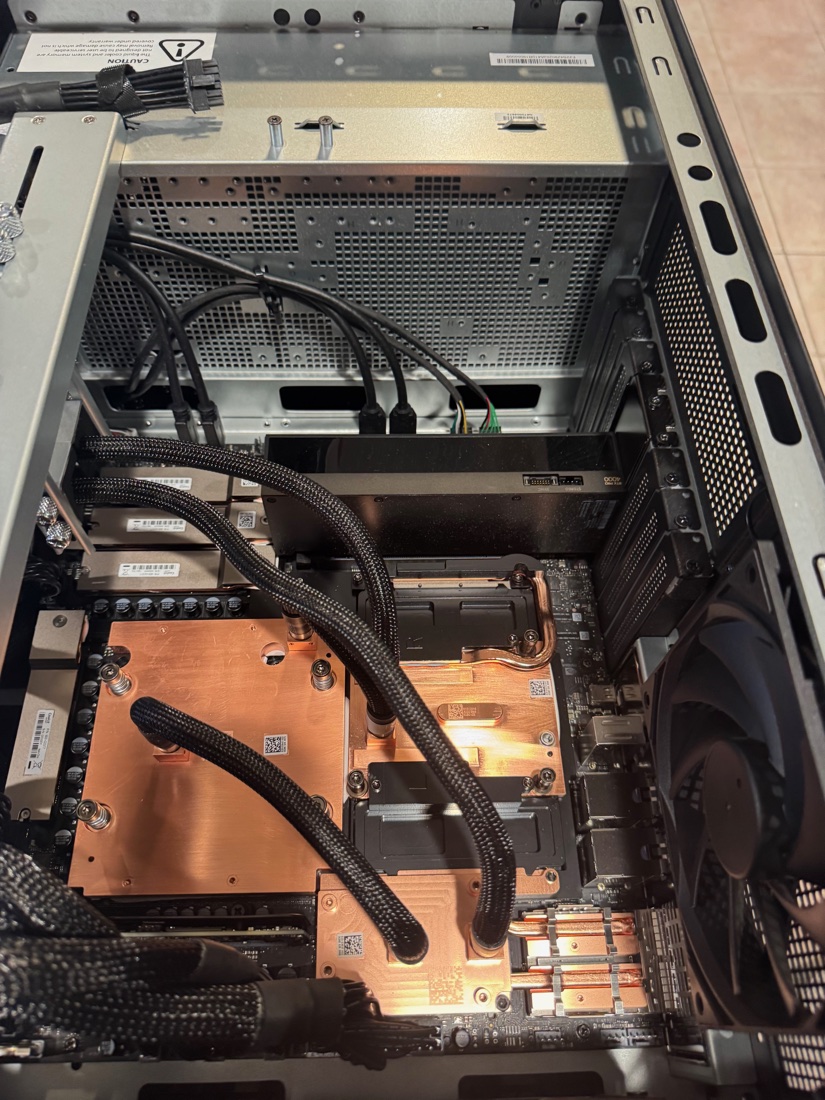
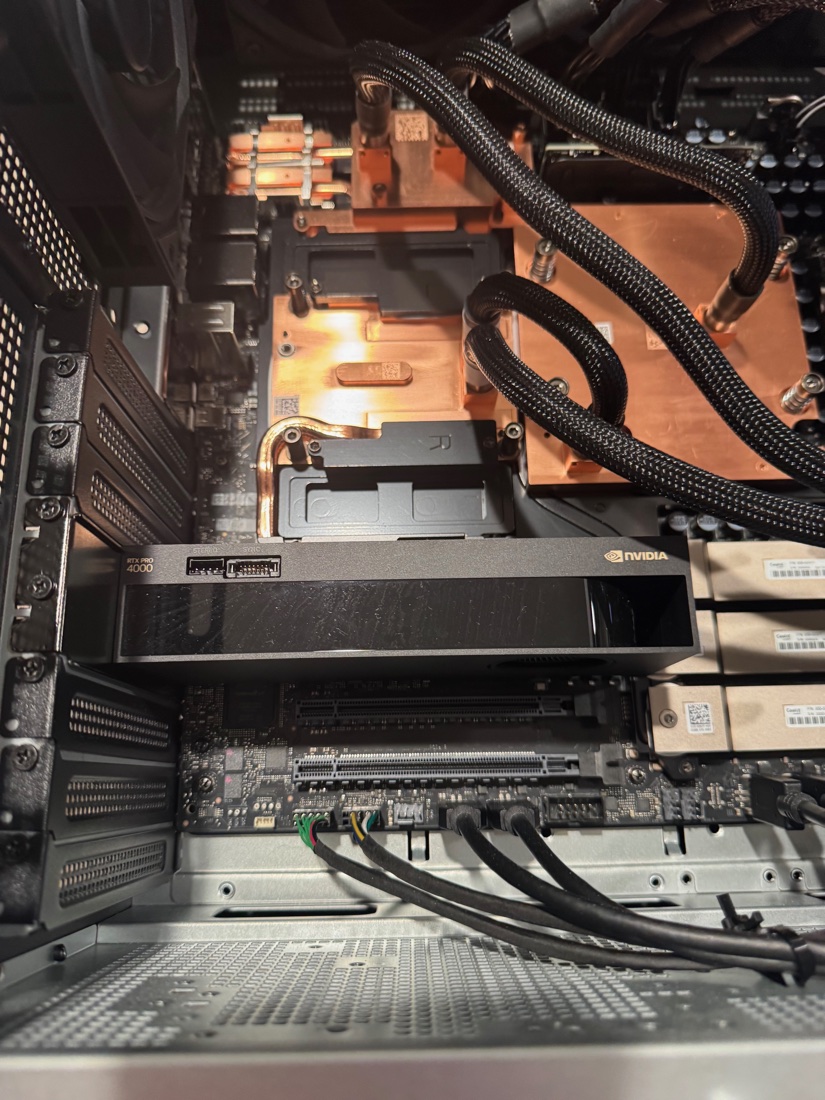
Before: the RTX PRO 4000 SFF in the double-wide slot. 24 GB, 70 W, no auxiliary power, mini-DisplayPort only. Photo by James, unaltered.
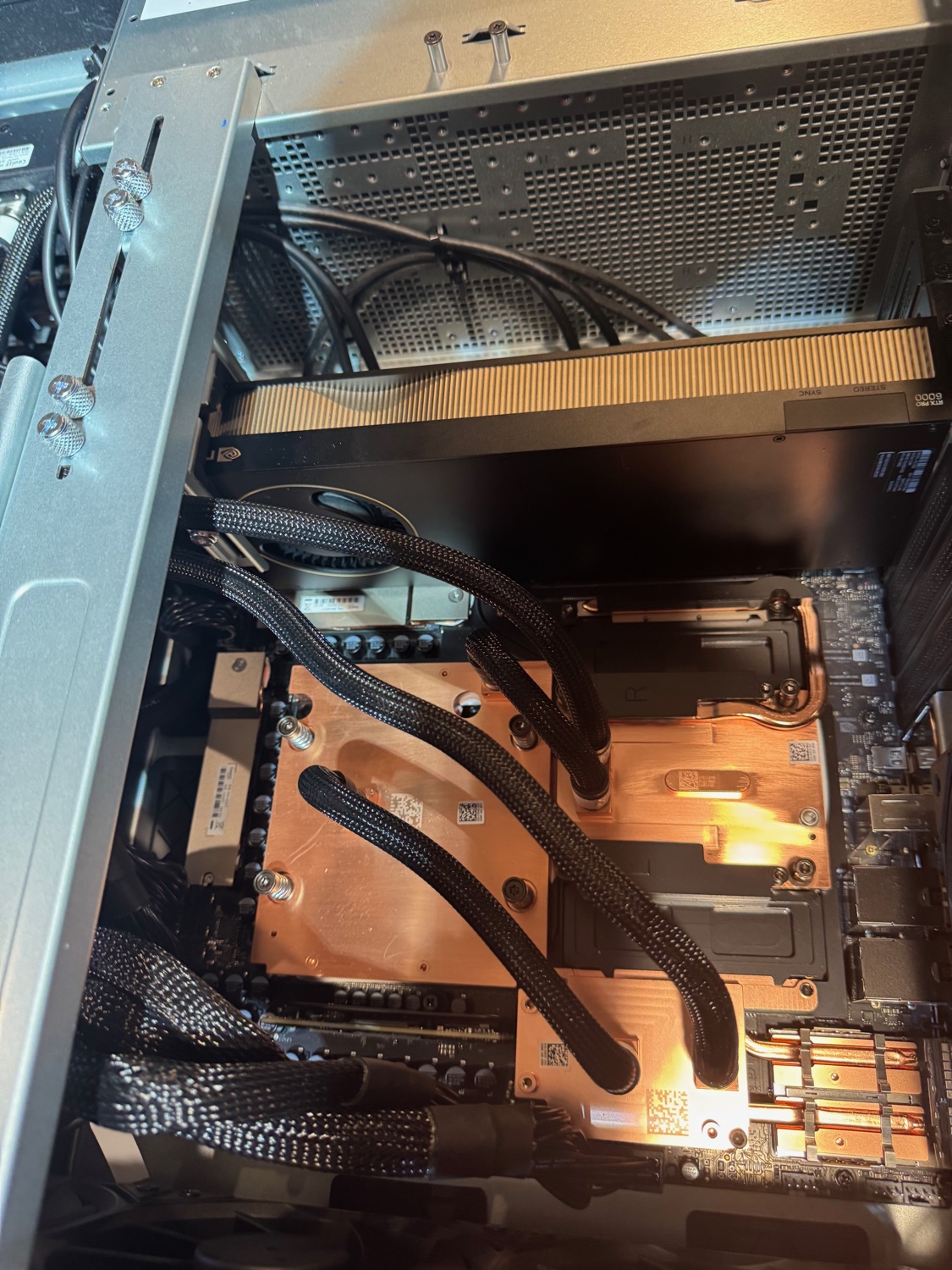
After: the Max-Q in the same slot. The RTX PRO 6000 silkscreen sits at the far end, next to the STEREO and SYNC connectors that give the professional cards away. Photo by James, unaltered.
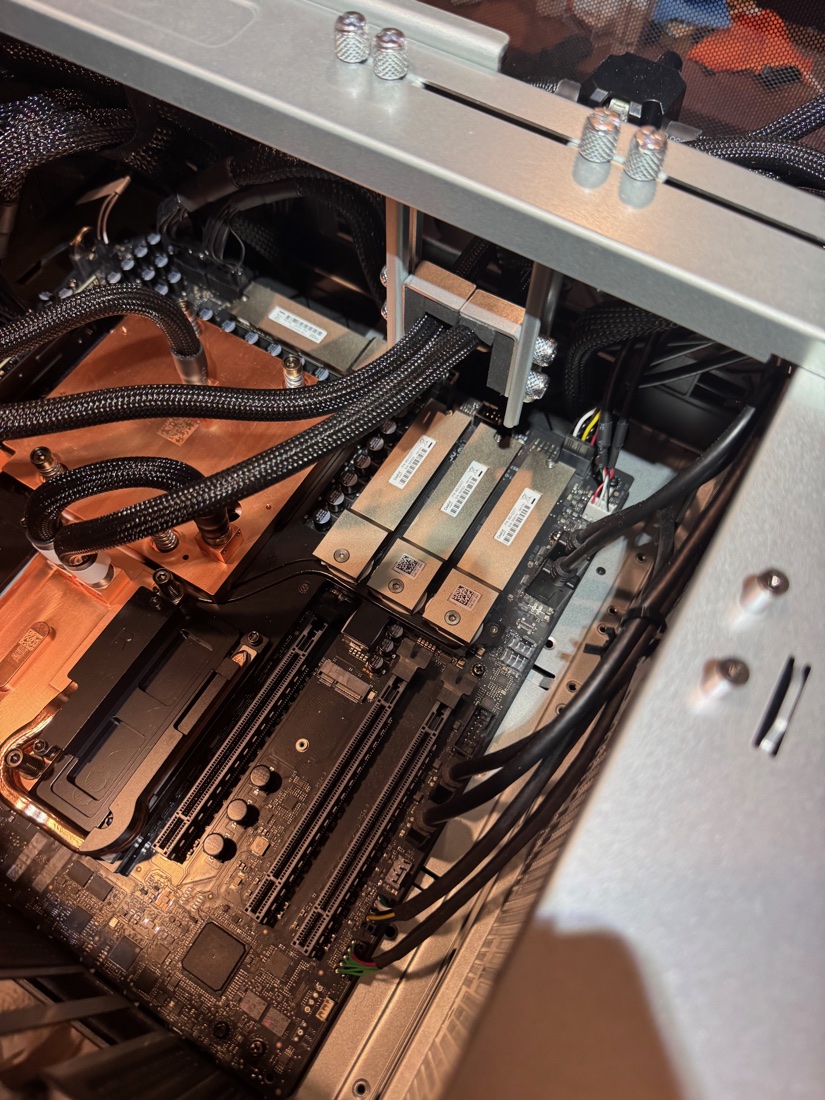
The front half, none of it touched: Grace cold plate and coolant lines, three M.2 modules, DIMMs. Photo by James, unaltered.
- The chassis already had the cable. The WS300 ships a pre-wired 12VHPWR lead that mates with the card's CEM5 16-pin socket. It latched.
- The slot was already right. The double-wide PCIe 5.0 x16 is the only slot the card belongs in; the two single-wide slots are x8 electrical.
- The bracket is what fought. The vertical brace's anti-sag bracket took a while. That is the whole difficulty: a 300 W dual-slot card in a chassis designed for one.
- The 4000 is the rollback card. It still works, and reversing the swap is a 20-minute job.
The power budget moved before the card did
The Station's supply is 1,600 W and it is shared between the GB300 module (GB300 plus Grace) and an optional RTX card. NVIDIA's calcGb110Cap table sets the module's share at boot from the rating of the installed RTX, not from whatever you set later:
| Installed RTX rating | GB300 module cap |
|---|---|
| no RTX | 1,600 W |
| ≤ 75 W (the 4000 SFF) | 1,600 W |
| 76–300 W (this Max-Q) | 1,250 W |
| > 300 W (the 600 W Workstation Edition) | 950 W |
What the box reports, live:
GPU 00000009:06:00.0   (GB300)
  Module Power Readings
    Current Power Limit        : 1250.00 W   <-- enforced
    Requested Power Limit      : 1600.00 W
    Default / Max Power Limit  : 1600.00 W

GPU 00000004:01:00.0   (RTX PRO 6000 Max-Q)
    Current Power Limit        : 300.00 W
    Min / Max Power Limit      : 250.00 / 325.00 W
There is no vsloshd on this box. Not installed, not running — that daemon moves watts between module and card at runtime on NVIDIA's DGX OS 7.5 images. So the 1,250 W is not sloshing: it is a static clamp set below host software, with 1,600 W still showing as requested. Nothing on the box can move that line, and nothing needs to.
Figure 2. Static split at boot, as reported by nvidia-smi -q -d POWER on 2026-10-22.
The pre-install plan was wrong in the safe direction. It expected 300 W of card plus a 1,600 W module against a 1,600 W supply, and said to stop and confirm before powering on. The real sum is 1,550 W: the clamp we did not know about is what made it safe.
What the clamp costs when the lane is busy
Power-by-phase sampling on the sidecar lane — five phases, nvidia-smi module draw and clock-event reasons:
| Phase | GB300 module p99 | SW power cap active | GB300-only control |
|---|---|---|---|
| idle, model loaded | 385 W | 0.00% of samples | 361 W · 0.00% |
| C1 decode | 861 W | 0.00% | 872 W · 0.00% |
| C32 decode | 1,263 W | 2.42% | 972 W · 0.00% |
| 64K-token prefill | 1,353 W | 89.47% | 1,279 W · 65.00% |
| 32× 8K prefill | 1,342 W | 85.71% | 1,300 W · 51.72% |
The GB300 was already hitting its power cap in prefill before the card arrived — 65% of 64K-prefill samples on the GB300-only arm — so this is not a new cliff. But the sidecar lane spends more of prefill capped (89%), and instantaneous module draw runs above the 1,250 W line while the platform clamps after the fact. Prefill on this box is power-bound, and 230 W of extra card is part of why.
vsloshd to "recover" the 50 W. The documented best case is 50 W of module headroom, and only when the module sits within 50 W of its cap while the card has more than 100 W spare — not the C1 case, where the card idles around 90–145 W. The downside is worse: the card's policy maximum is 325 W, and if the algorithm reads that as its rating, the module drops into the >300 W row at 950 W. Leave it alone.Electrical. Worst case is 1,600 W DC through a Platinum supply, ≈1,800 W at the wall, ≈15 A at 120 V. That fits a dedicated 20 A circuit (16 A continuous) with a little margin and does not fit a 15 A circuit. The Station has its own dedicated 20 A circuit, nothing else on it.
120 V is not the limit
This supply delivers its full 1,600 W from 115 to 240 V. A US 120 V wall sits inside the full-power band; the only de-rated band is 100–114 V, which is Japan. The full treatment — clock loss per phase, peaks versus averages, when 240 V is worth it — is GB300 with RTX 6000, and 120V Power.
| AC input | PSU capability |
|---|---|
| 100–114 V | 1,300 W |
| 115–240 V | 1,600 W — our wall is 120 V |
The measured peak agrees with the nameplate. Our worst prefill instant was a 1,353 W module with a 194 W card: 1,547 W DC, ≈14.5 A. Fans, pumps, drives and the NIC add roughly 60–120 W, which puts a full-system peak at 1,607–1,667 W DC, ≈15.0–15.6 A against 16 A of continuous capacity — 0.4–1.0 A of margin. Thin enough that the word "dedicated" is doing real work. The circuit is not what limits this machine; it also has no room for a space heater.
What 240 V would actually change
- Efficiency: about a point better at 230 V, roughly 10–16 W less PSU waste heat. An estimate — there is no wall meter on this box.
- Current: 15 A becomes ~7.5 A. Worth it only for two Stations on one circuit, or a 15 A circuit. Neither applies.
- Performance: nothing, in decode, prefill or sustained load. The clamp is a 1,250 W firmware split on the DC side; no wall voltage moves it.
The signature of a wall throttle would be clocks falling while the power limits still read full. We have never seen that here; what we see is sw_power_cap, which is the module cap working as the firmware intends. A ±3% spread between runs is the neutral band on this box, not a symptom.
The console cable stopped fitting
The 4000 had four mini-DisplayPorts, with a mini-DP dongle for the JetKVM. The 6000 has four full-size DisplayPort 2.1b outputs. The dongle does not fit, so the JetKVM is not connected — the one loose end of the install, and now a part on order.
- It needs an active, full-size DisplayPort → HDMI adapter. Not mini-DP, not USB-C, not HDMI → DP. One is ordered.
- Until it lands the box is headless, which is fine: every number in this post came in over SSH. The rear chassis mini-DisplayPort is the BMC at 1024×768, not a path to the OS desktop.
Two GPUs, no P2P
$ nvidia-smi topo -m        # GB300 <-> RTX
        CPU    NIC
GPU0    SYS    SYS
GPU1    SYS    SYS

$ nvidia-smi topo -p2p r    # P2P read
GPU0    NS
GPU1    NS
No NVLink and no peer-to-peer over PCIe, so anything split across the two GPUs moves through host memory. That is the only available path, not a tuning choice. On driver R595 a CUDA process also sees one GPU modality (ATS for the GB300, non-ATS for the RTX), and /etc/cuda-gpu-select/env pins CUDA_VISIBLE_DEVICES=1 so containers keep getting the GB300.
What it bought
The card is not display and not "more FLOPS on the side": it holds the 89 cold experts per layer and computes them locally, so activations cross a PCIe slot instead of 62 GiB of weights crossing NVLink-C2C per pass. The full same-window measurement is in DeepSeek-V4.1-Flash on a GB300 + RTX PRO 6000 Sidecar; the short version:
Twelve quality gates passed in the same window — teacher-forced flips, GSM8K-1319 flat at 96.97%, BFCL dev and held-out within 1 point, needle 500/500, per-class decode 20/20 — so the card is not buying speed with accuracy.
It also did not fix everything. On the v0.31.0 arm the sidecar had one runaway in 32 bench requests (the published lane image had zero) and the speed bar at C8 came in at −3.8%, which is why the recipe stayed on the af7f9488 image.
Still open
- JetKVM adapter. Ordered: one active full-size DP → HDMI adapter. When it arrives the console is whole again; until then out-of-band video is the BMC at 1024×768.
vsloshd. Decision made: not installing it. Reopen only if module power sits at ≥1,200 W with power-cap events during prefill and an OEM-supplied package appears.- Firmware. No BIOS, BMC or VBIOS release is documented to change the module cap. Do not chase one for power; if firmware is wanted for other reasons it comes from the OEM as a
Galaxy-GB300-WSbundle over Redfish, not LVFS. - Soak. The lane is under a fail-closed watchdog with a multi-day soak. That is the next thing that can change the verdict, and it is a serving question, not an install one.
Receipts
# what is in the box
nvidia-smi -L
nvidia-smi --query-gpu=index,name,memory.total,power.limit,power.min_limit,power.max_limit,pci.bus_id --format=csv
nvidia-smi -q -d POWER            # GPU and Module Power Readings, both GPUs
lspci -nn | grep -iE "vga|3d|display"
systemctl is-active vsloshd; dpkg -l | grep -Ei "vslosh|smbpbi"

# topology
nvidia-smi topo -m
nvidia-smi topo -p2p r
cat /etc/cuda-gpu-select/env
Boot history, from the box: journalctl --list-boots shows the previous boot ending 2026-10-21 14:05:44 CDT and the current one starting 16:33:31 CDT. Lane state, power-by-phase tables and the sidecar gates live in ~/dsv41/results/ledger.md and ~/dsv41/m3/ on the Station.
Sources
- NVIDIA DGX Station development guide, Dynamic Power Sloshing — docs.nvidia.com
- DGX Station datasheet (252 GB HBM3e at 7.1 TB/s, 496 GB LPDDR5X at 396 GB/s, 900 GB/s NVLink-C2C, 1,600 W, slots) — nvidia.com
- RTX PRO 6000 Blackwell Max-Q Workstation Edition datasheet (96 GB GDDR7, 1,792 GB/s, 300 W, 5349650) — nvidia.com
- Mixed coherency, ATS vs HMM, no P2P — docs.nvidia.com
- nvidia-smi manual, GPU vs Module power readings — docs.nvidia.com
- MSI XpertStation WS300 (slot layout, pre-wired 12VHPWR, anti-sag) — msi.com · StorageReview
- Same-slot Max-Q measurements, not an install procedure — original-el8/dgx-station-gb300-research